Google’s automated bidding only shows average CPC, hiding where it overpays. Here’s how to add a max CPC ceiling with portfolio bidding and keep control.
If you run Google Ads on automated bidding, the platform only shows you an aggregated Average CPC across your campaigns. It does not show you what you actually paid for each individual click. That single blended figure is where the trouble hides. The algorithm can overpay for the clicks it prioritises, and those expensive outliers get smoothed into an acceptable-looking average. Your account looks efficient at the campaign level while quietly wasting budget on a small subset of overpriced clicks. The good news is that you can keep the automation and still put rails around it. This post walks through why the problem exists, how to regain control with portfolio bidding, and how to run a report to get as close to click-level CPC as Google will allow.
Why does Google bid more for some clicks than others?
Before you try to cap anything, it helps to understand why the algorithm pays far more for one click than another. It is not random. Automated bidding sets a bid for every auction in real time, and that bid reflects how valuable Google thinks the click will be to you.
Most of that comes down to the search history on your account and the behavioural patterns Google has seen before. Google holds a huge amount of data on how people behave in the run-up to a conversion, and it is constantly looking for familiar patterns. If the signals around a particular search look like something that has previously led to a conversion in your account, Google reads that as a strong buying signal and bids more aggressively to win the click. Those patterns come from a mix of things: the sequence of searches, the content someone has engaged with, their device, the time of day, their location and the exact wording of the query. It is the combination, the behavioural fingerprint, that Google matches against its record of past converters.
The auction then pushes the price up or down. You are bidding against other advertisers for the same slot, so when several of you all want the same high-intent click, the cost to win it goes up. Quality Score matters here too: a stronger one can win you a position for less, a weaker one means you pay more. So the algorithm concentrates your spend on the clicks that most closely match your past conversions, and it will happily pay a premium for them. That is usually sensible, but the prediction is not always right, and a handful of premium-priced clicks can cost far more than they return while disappearing into a tidy campaign average.
Why does Google’s automated bidding hide your true cost per click?
Google’s automated bidding strategies, Target ROAS, Target CPA, Maximise Conversions, Maximise Clicks and Target Impression Share, all share the same reporting limitation. They only show you aggregated Average CPC across your campaigns, never the true cost of each individual click.
That design choice matters for anyone watching a small budget. It means individual click costs are hidden. You see one blended Average CPC per campaign, but not what Google actually paid for each click. It also means overpayments get smoothed into the average. The algorithm can overpay for the clicks it prioritises, but those expensive outliers disappear into an acceptable-looking average figure.
The root of it is that users cannot see true per-click costs. Google only provides campaign-level aggregated data, so there is no native, transparent per-click cost view inside the interface. In practical terms, your account can look perfectly efficient at the campaign level while a handful of overpriced clicks quietly eat into your spend.
How can you regain control without turning off automation?
You do not have to abandon automated bidding to fix this. You need to change where the bidding logic lives.
The core move is to shift from campaign-level bidding to a portfolio bidding strategy. Instead of assigning Target ROAS, Target CPA or the others directly at campaign level, you use a portfolio bidding strategy. Within a portfolio, you can set a maximum CPC bid limit, something standalone automated campaigns simply do not permit.
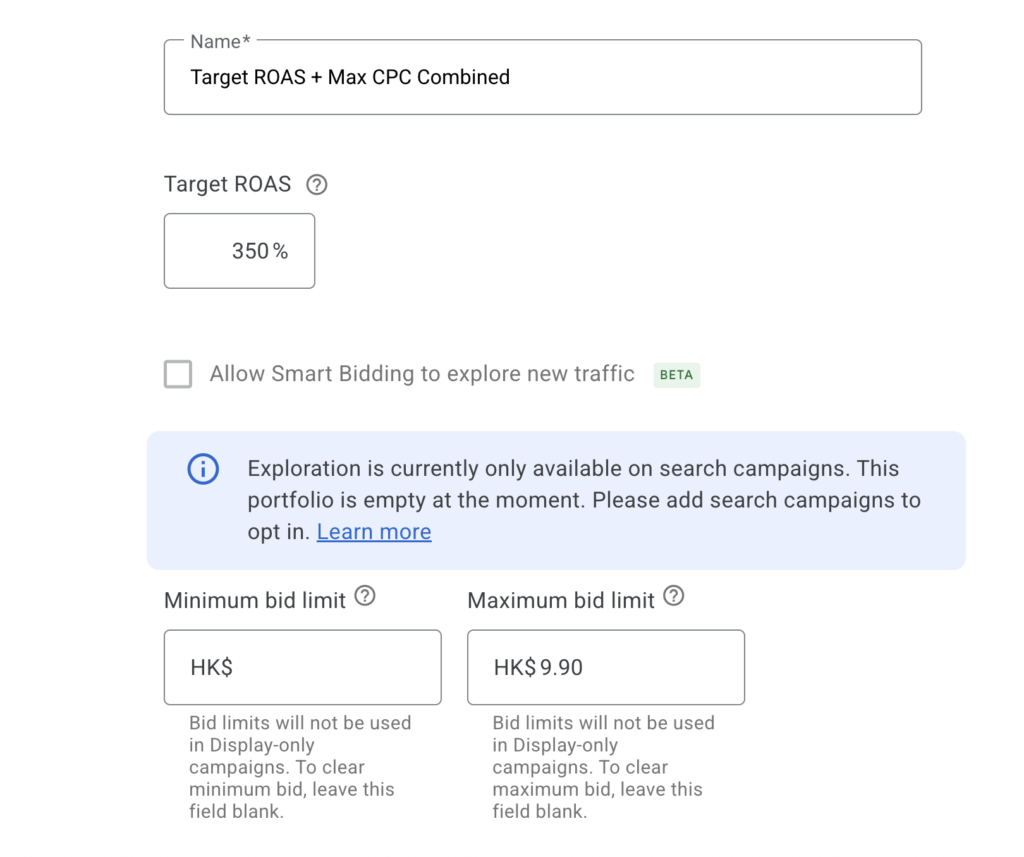
One point that trips people up is the word ‘portfolio’. It sounds like it has to contain a whole group of campaigns, but it does not. You can apply a portfolio strategy to a single campaign on its own and still get the max CPC control. So if your account needs different targets at campaign level, you are not forced to lump everything together under one shared target. You can create a separate portfolio per campaign, each with its own Target ROAS or Target CPA and its own ceiling, and keep the granular control you need.
The important part is that the algorithm still optimises toward your efficiency targets, whether that is Target ROAS, Target CPA, conversions or impression share. It just cannot exceed the CPC ceiling on individual clicks. You are not fighting the algorithm here. You are putting rails around how much it is allowed to pay for any single click, which is a very different thing.
How should you set the max CPC ceiling?
The CPC ceiling is the key control, and it is worth taking the time to get it right. Set it wrong and you either allow waste to continue or you choke your own volume. The point of the ceiling is to target outliers, not to micro-manage every bid.
A sensible starting point is to set the ceiling at roughly twice your Avg. CPC. This targets outlier overpayments while preserving normal click costs. You are effectively telling the system it can keep doing what it is doing, but it cannot pay wildly more than a typical click.
There is a risk to be aware of. Setting the ceiling too low can throttle volume and reduce impression share. If the cap sits below what the auction consistently requires, your ads simply stop entering or winning enough auctions. You will see fewer impressions, lower impression share and potentially lost conversions.
This is not a tactical tweak. It is a structural change affecting budget efficiency. You are redefining the maximum price the system is allowed to pay to achieve your goals, so treat it with that level of care.
When does this portfolio and ceiling approach work best?
This portfolio-plus-ceiling setup works best when you have sufficient conversion data. You need enough historical conversions for the efficiency target, your Target ROAS or Target CPA, to be meaningful in the first place.
With sparse data, the system’s learning is fragile. Adding a CPC ceiling on top of thin conversion data can limit its ability to explore and optimise, which is the opposite of what you want. If you are still in the early stages of gathering conversions, it is usually better to let the automation settle before you introduce a cap.
Where you already have strong conversion volume and stable performance, introducing a CPC cap at the portfolio level becomes a way to contain waste without disrupting proven automation. That is the ideal moment to apply it: enough data to trust the target, enough performance history to know what a normal click should cost.
How do you get as close as possible to click-level CPC in Google Ads?
Google does not show you the cost of an individual click anywhere in the platform. What you can do is get as close as possible by pulling the most granular cost and click data the interface will give you and working out the average CPC yourself, segment by segment. Here is the workflow I follow, all within the standard Google Ads interface.
Build a report in the Report editor with cost and clicks
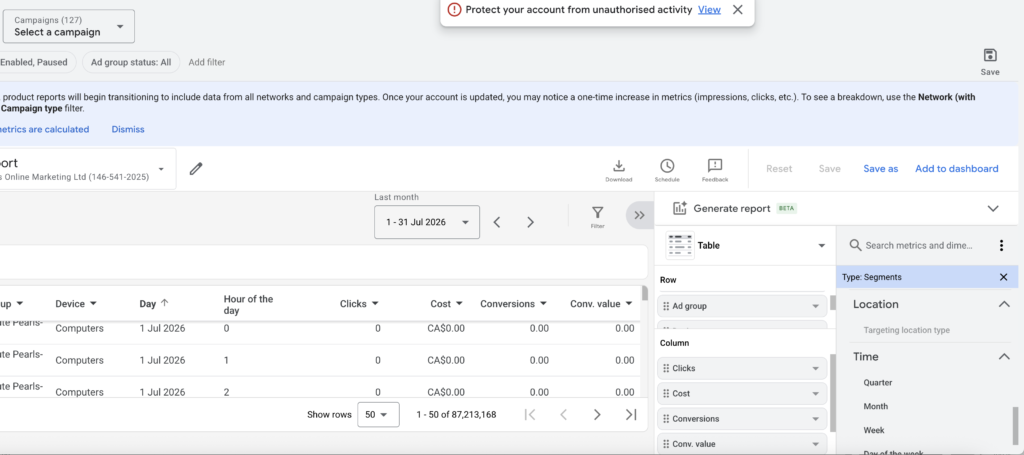
From within Google Ads, go to Campaigns, then Insights & reports, then Report editor. Build a report using Campaign and ad group in the rows only. Then the Cost, Clicks, Conversions and Conv. Value (if you sell online) under columns and break it down by the lowest meaningful level you can work with. Set the date range to 3 months or even up to 6 months if you have low traffic.
Segment by device, day and hour to expose the outliers
Segment the same report by device, day of the week and hour of the day where you can. This is where overpayments usually cluster. A particular device or time slot might carry a much higher cost per click than the rest of the account, and until you break the data out this way it stays buried in the blended campaign average. Export the report to a spreadsheet so you can work with it. The goal is just to try and get as few clicks per row as possible.
Calculate Average CPC for each segment
In your spreadsheet, for each row, calculate Average CPC as Cost divided by Clicks. This is the same definition Google uses, so you are simply recreating the metric at a finer grain than the interface shows you by default. Now you have an average CPC for each ad group, day, device or time slot, rather than one blended figure smeared across the whole campaign.
Sort by CPC to spot where the overpayments sit
Sort your calculated CPC figures from high to low and look at the top of the list. You will not get a perfect cost attached to every single click, but you will see which segments are driving the higher blended costs. That is exactly the information you need to set a sensible ceiling: you can see roughly where a normal click sits and where the outliers begin, rather than guessing at a number.
For example if you spot that there are 20 or 30 clicks above £10 then double check the conversions and revenue for those same clicks and see what the CPA or ROAS is. If it is poor then you can set the Max Bid cpc to £10 – or perhaps go ¥lower or higher depending on what you see in the report.
Frequently Asked Questions
Why does Google only show average CPC and not individual click costs?
Google’s automated bidding strategies only expose aggregated Average CPC at the campaign level. The interface provides campaign-level aggregated data rather than a cost figure per click. This means expensive outlier clicks the algorithm prioritises get smoothed into the average, so you cannot see the true per-click cost natively inside Google Ads.
What is a portfolio bidding strategy in Google Ads?
A portfolio bidding strategy applies an automated bidding approach that lets you set a maximum CPC bid limit, which standalone campaigns do not permit. Despite the name, it does not have to group several campaigns together. You can apply a portfolio to a single campaign on its own, so campaigns that need different targets can each have their own portfolio and ceiling.
How high should I set my max CPC ceiling?
A practical starting point is roughly twice your current Avg. CPC. This targets outlier overpayments while preserving normal click costs. Setting it too low risks throttling your volume and reducing impression share, because your ads stop winning enough auctions. Use the ceiling to catch outliers, not to micro-manage every individual bid.
Will adding a CPC ceiling hurt my campaign performance?
It can if you set it too low or apply it to campaigns with sparse conversion data. With thin data, the algorithm’s learning is fragile and a cap limits its ability to explore. The approach works best when you already have sufficient conversion volume and stable performance, so the efficiency target is meaningful before you add the ceiling.
Can I see the exact cost of each individual click in Google Ads?
No. Google does not report the cost of any individual click. The closest you can get is building a report in the Report editor with Cost and Clicks broken down by ad group, day, device and time, then calculating Average CPC as Cost divided by Clicks in a spreadsheet for each segment. That reveals where the higher costs are concentrated.
Final Thoughts
The reason this matters is simple: on a limited budget, a small number of overpriced clicks can quietly undo an otherwise efficient account, and Google’s reporting is not built to show you where. Moving your automated campaigns into a portfolio bidding strategy and setting a max CPC ceiling at roughly twice your average CPC gives you the best of both worlds. You keep the efficiency of automation and you put a sensible limit on how much the system can overpay. Pair that with a click-level report and you finally get a clear enough view of where your money is going. At Deep Footprints Digital, we help UK small businesses build campaigns on a solid foundation rather than fragmented tactics, combining the speed of AI with the rigour of a proper marketing workflow and a mandatory human review stage. If you would like a considered second opinion on where your ad spend is leaking, book a strategy audit and we will take a proper look.